Manage Payments
This section allows you to manage all payments received in your iBill.io system, ensuring accurate billing and financial records.
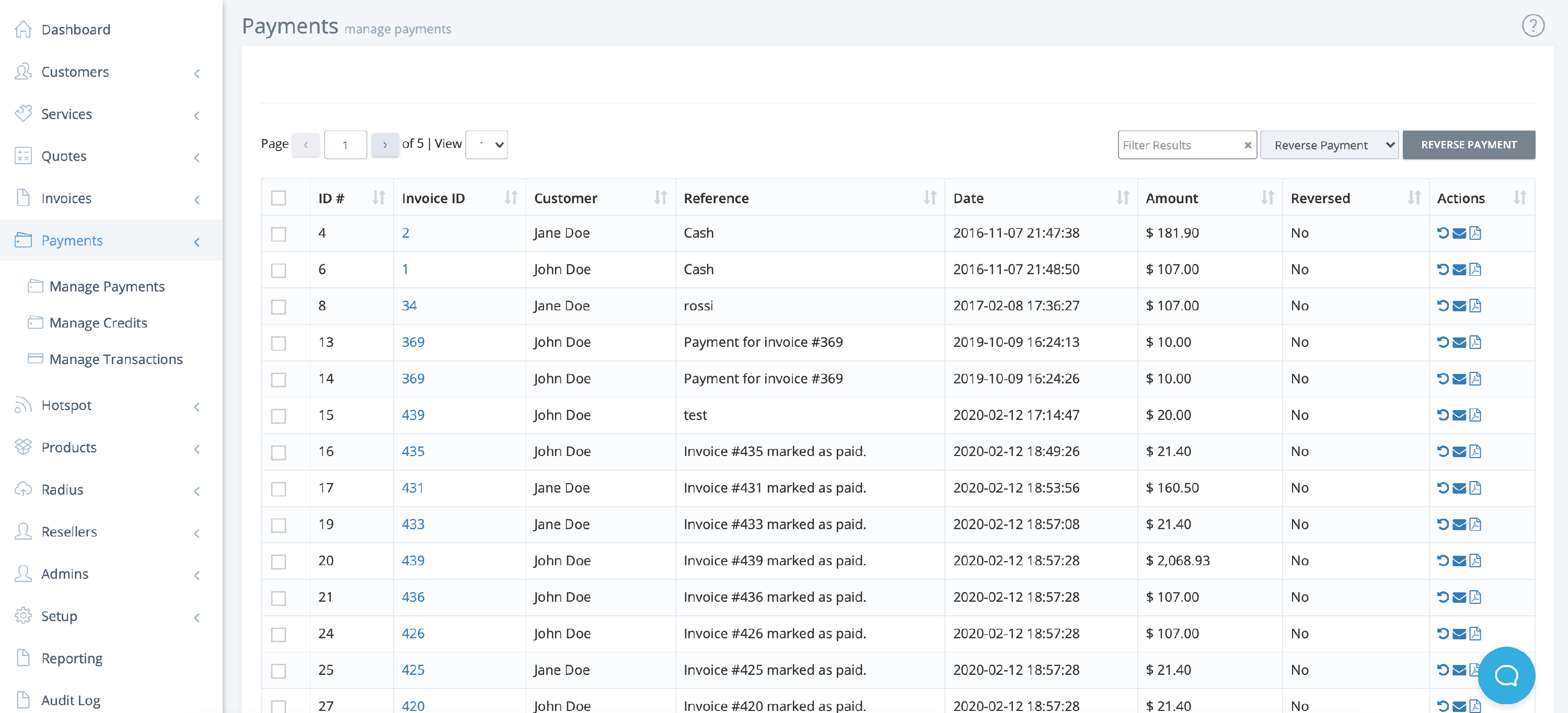
Payments List Overview
- ID: Unique payment identifier
- Invoice ID: Linked invoice (click to view invoice details)
- Customer: The customer who made the payment
- Reference: Payment reference or description
- Date of Payment
- Amount Paid
- Reversed: Indicates if the payment has been reversed
- Actions: Manage the payment (reverse, email receipt, download receipt)

Payment Actions
- Reverse Payment: Undo a payment if necessary
- Email Payment Receipt: Send a receipt to the customer
- Download Payment Receipt: Save a PDF copy for your records
- Bulk Actions: Select multiple payments to perform actions in bulk
- Quick Access: Click the invoice ID to jump directly to the related invoice
Best Practices
- Reconcile payments regularly to ensure accuracy
- Use references and notes for clear record-keeping
- Review reversed payments for potential issues
If you need further assistance, click the support button at the top right of this page.