Adding Administrators - testing this to see if i can get it to work ... sigh
Administrators (Admins) are trusted team members with backend access to your iBill.io system. They play a vital role in managing users, configuring system settings, and ensuring the smooth operation of your ISP, billing, and RADIUS platform. Only assign admin rights to staff who require elevated privileges and understand the responsibilities involved.
How to Add an Admin User
-
Access the Admins Section
Click the help link on the top right of the Admins page to view this guide. -
Provide Required Information
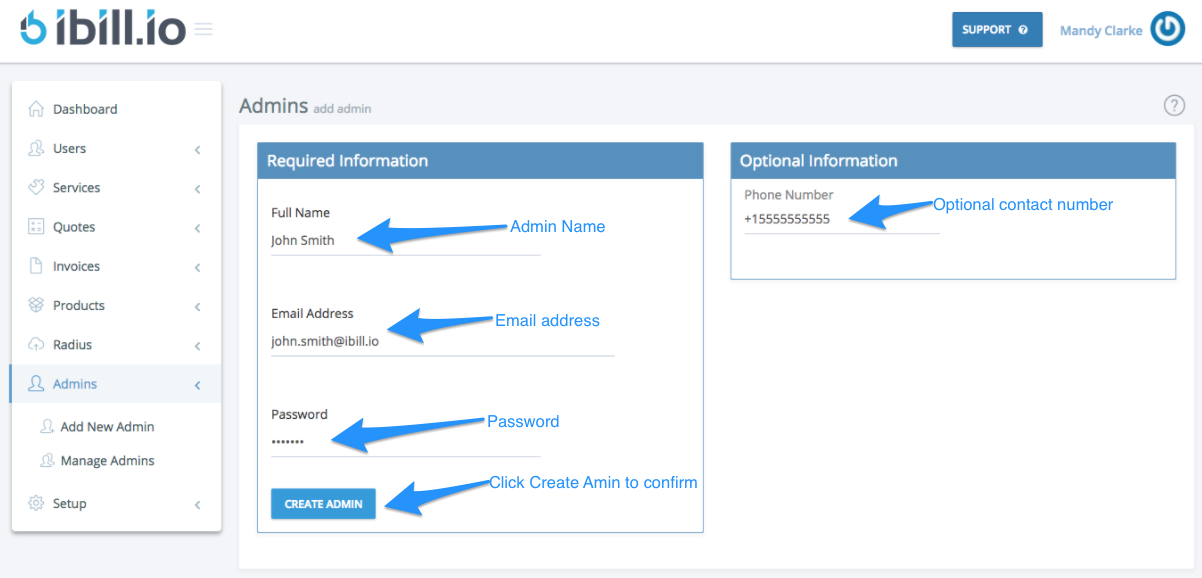
Enter the following details: -
Full Name: The administrator’s full name.
- Email Address: Used for login and notifications. Must be unique.
- Password: Choose a strong password.
-
Contact Number (optional): For communication or two-factor authentication.
-
Create the Admin
Click Create Admin to add the new administrator.
- Edit Admin Details
After creation, you will be directed to the Edit Admin page, where you can assign permission groups and further configure the admin’s access.
Tip: If you need further assistance, click the support button at the top right of this page.